Driving TuiView from Python
Introduction
Although TuiView is a useful program on its own, sometimes it may be useful to embed some of its functionality within another script. In this way you can build a customised image viewer. Since TuiView is just a Python module you can access it from any Python script. However, a certain amount of Qt/PySide knowledge is required for building user interfaces. This tutorial is based on the TuiView wiki. Documentation for the TuiView internals can be found at the TuiView Developer Documentation.
Creating a TuiView widget within your own window
This is the simplest scenario. You have your own window, but you want one of the widgets to be a TuiView map:

Below is the source for this application:
import sys
from PySide6.QtWidgets import QApplication, QWidget, QVBoxLayout
from tuiview import viewerwidget, viewerstretch
from osgeo import gdal

gdal.UseExceptions()

app = QApplication(sys.argv)

ds = gdal.Open('a.tif')
stretch = viewerstretch.ViewerStretch()
stretch.setRGB()
stretch.setBands([4, 3, 2])
stretch.setStdDevStretch()

w = QWidget()

tmap = viewerwidget.ViewerWidget(w)
w.show()

# Note that TuiView expects the widget to be shown before
# adding a layer
tmap.addRasterLayer(ds, stretch)

layout = QVBoxLayout()
layout.addWidget(tmap)
w.setLayout(layout)
w.resize(250, 150)
w.move(300, 300)
w.setWindowTitle('Simple')

app.exec()
Creating new viewers
If you are happy with the way the TuiView windows look, but you just want to drive
them programmatically, the recommended way to do this is to use the GeolinkedViewers
class:
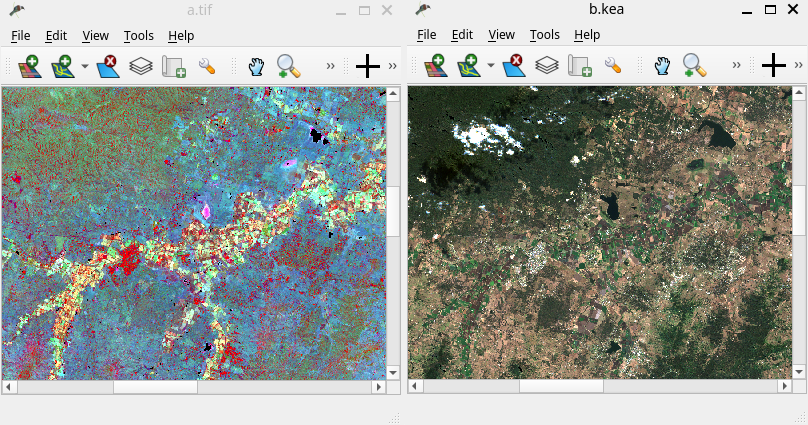
Below is the source for this application:
import sys

from PySide6.QtWidgets import QApplication

from tuiview import geolinkedviewers
from tuiview.viewerwidget import GeolinkInfo

app = QApplication(sys.argv)

glviewers = geolinkedviewers.GeolinkedViewers()
viewer1 = glviewers.newViewer('a.tif')
viewer2 = glviewers.newViewer('b.kea')

# The first parameter is the 'id' of the sender;
# set to 0 if not sent from inside TuiView.
# Then pass Easting, Northing and meters per pixel as zoom factor
obj = GeolinkInfo(0, 1976486, -3144006, 100)
glviewers.onMove(obj)

app.exec()
Conclusion
Most aspects of TuiView can be automated from a Python script. This means you can create your own custom applications that re-use TuiView functionality without having to reinvent the wheel.